Native macOS App · Hand tracking with Apple Vision
TOM · Touch On Mac
TOM — Control Your Mac by Hand
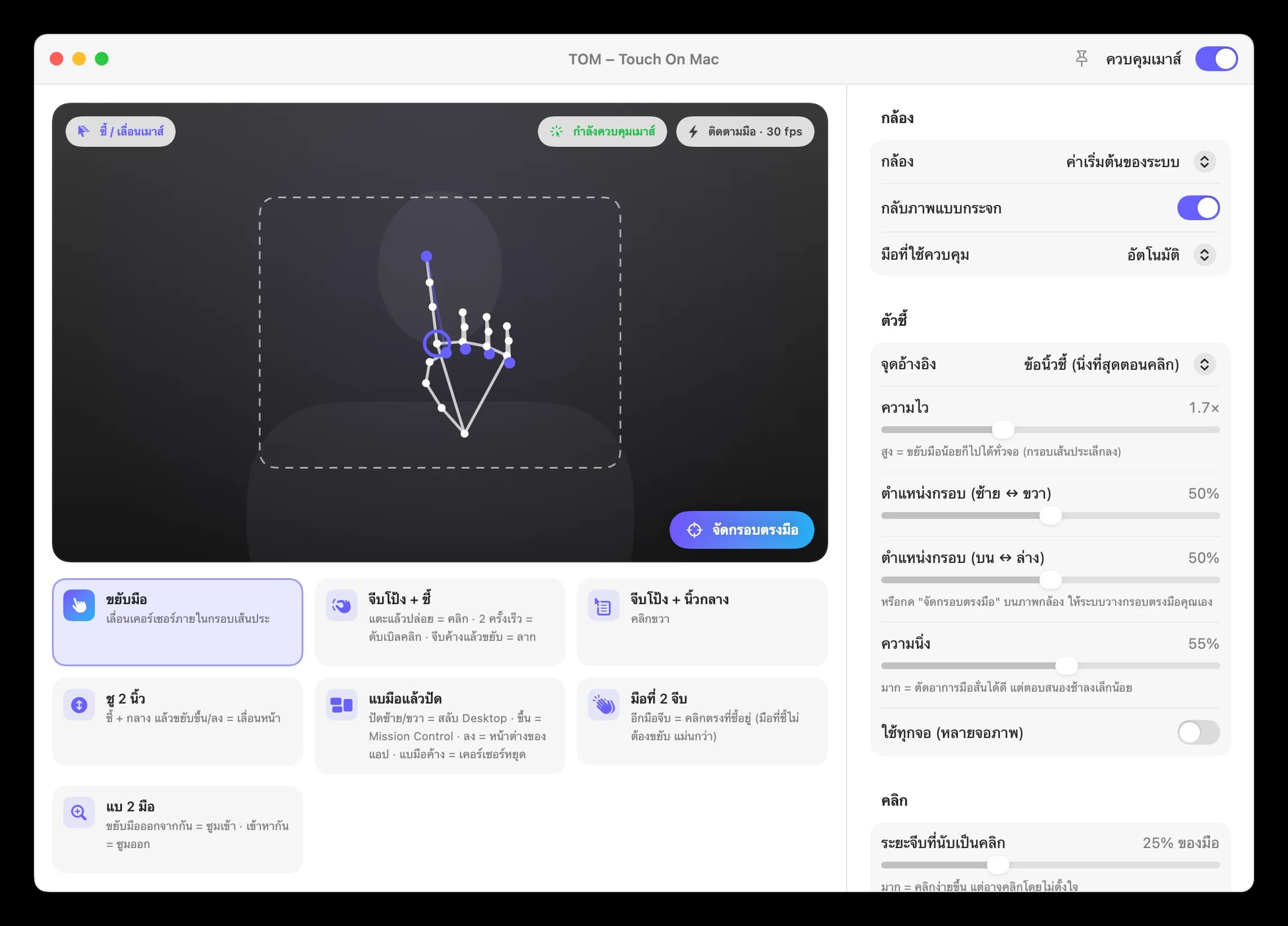
TOM ใช้กล้องของ Mac ร่วมกับ Apple Vision ตรวจจับมือและนิ้วแบบเรียลไทม์ แล้วแปลงเป็นการเลื่อนเคอร์เซอร์ คลิก ลาก คลิกขวา และเลื่อนหน้า รองรับท่าสลับงานแบบ trackpad และการใช้สองมือพร้อมกัน ภาพจากกล้องประมวลผลภายในเครื่องทั้งหมด และแอปจะลดความถี่ในการประมวลผลเองเมื่อไม่เห็นมือ เหมาะสำหรับการนำเสนองาน การใช้งานแบบไม่ต้องสัมผัส และผู้ที่ต้องการทางเลือกเพิ่มเติมจากเมาส์และ trackpad
TOM uses your Mac's camera and Apple Vision to follow your hand and fingers in real time, turning them into pointer movement, clicks, drags, right-clicks and scrolling. It also supports trackpad-style multitasking gestures and two-handed use. Camera frames are processed entirely on your Mac, and TOM lowers its processing rate automatically when no hand is in view. Designed for presentations, touch-free use and anyone who wants an alternative to the mouse and trackpad.
ไฮไลต์
- Swift
- SwiftUI
- AppKit
- Apple Vision
- AVFoundation
- ขยับมือเพื่อเลื่อนเคอร์เซอร์ จีบนิ้วเพื่อคลิกหรือลาก และชูสองนิ้วเพื่อเลื่อนหน้าMove your hand to steer the pointer, pinch to click or drag, and raise two fingers to scroll.
- แบมือแล้วปัดเพื่อสลับ Desktop หรือเปิด Mission Control เหมือนใช้ trackpadOpen your palm and swipe to switch Desktops or open Mission Control, just like a trackpad.
- ใช้มือที่สองคลิกได้แม่นยำขึ้น และแบสองมือเพื่อซูมเข้า–ออกClick more precisely with your second hand, and spread both hands to zoom in or out.
- ประมวลผลภายในเครื่องด้วย Neural Engine และลดความถี่เองเมื่อไม่มีมืออยู่หน้ากล้องRuns on-device on the Neural Engine and slows down automatically when no hand is in view.
ภาพจากระบบ
จีบนิ้วเพื่อคลิก
แบมือปัดเพื่อสลับ Desktop และใช้สองมือซูมได้